
Undo Receiving

For a consignment where receiving has started or completed, Undo Receiving enables admins to revert a consignment's status to its pre-received state ie., unprocessed status.
This feature is useful for correcting data inconsistency and operational errors, helping in accurate inventory management.

Prerequisites

User must have Admin privileges to access this feature.

Please be aware that administrators have the capability to revert the status of consignments through the Undo Receiving function, provided the putaway process for the respective consignment has not yet commenced.

Accessing the Undo Receiving Feature

  1. Navigate to the Consignment Action Section: Go to the consignments module on the platform. Find the consignment you need to undo-receive.

  2. Identify the Undo Receiving Button: Look for the "Undo Receiving" button you will be able to get this option when you click on the action button.
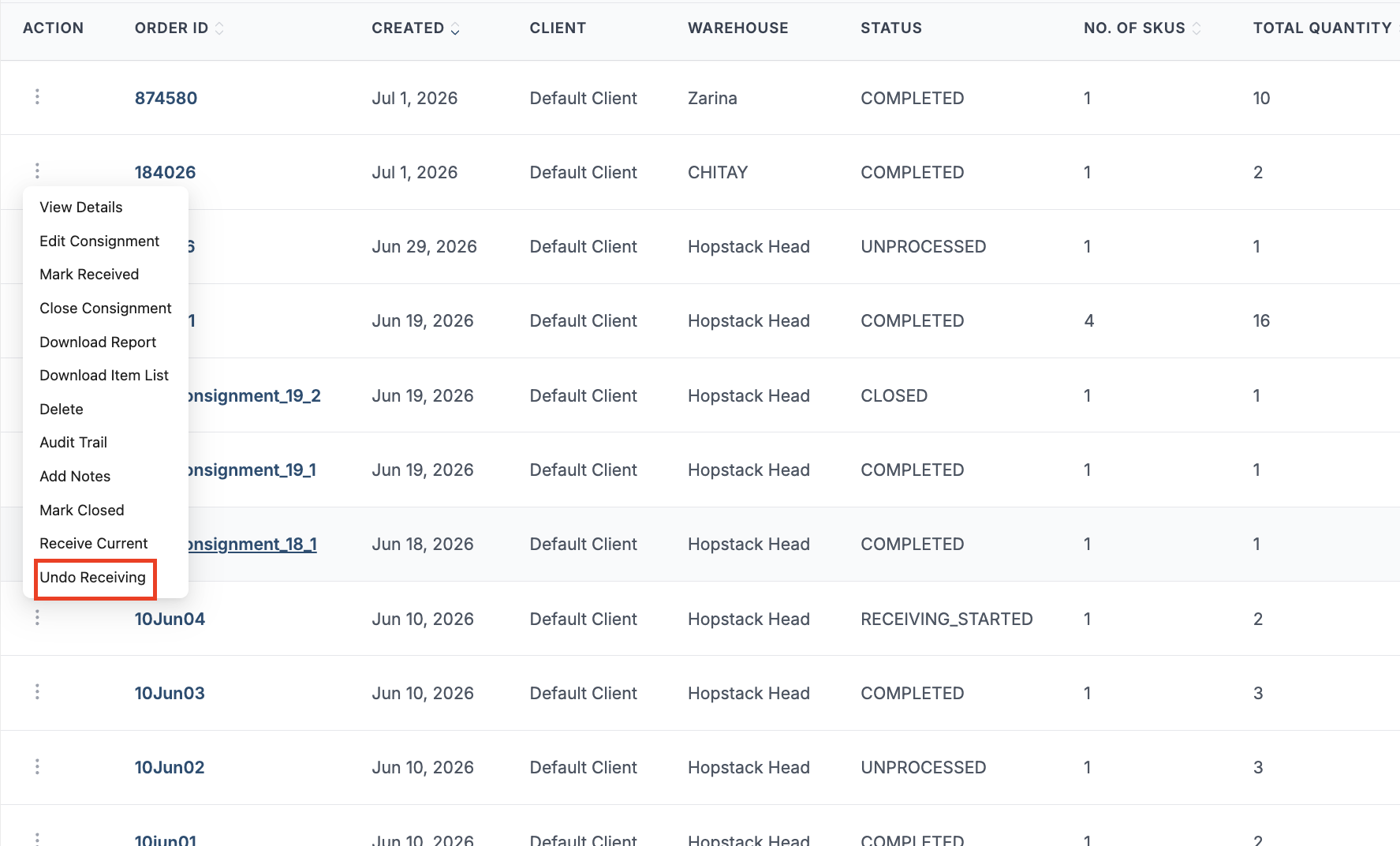
    image-20260706-133940.png


Using the Undo Receiving Feature

Step 1: Open the Undo Receiving Action

From the consignment view, open the kebab (three-dot) action menu.

Initiate the Undo Process: Click on the "Undo Receiving" button to start the process. A confirmation dialogue box will prompt you to ensure the action is intentional.
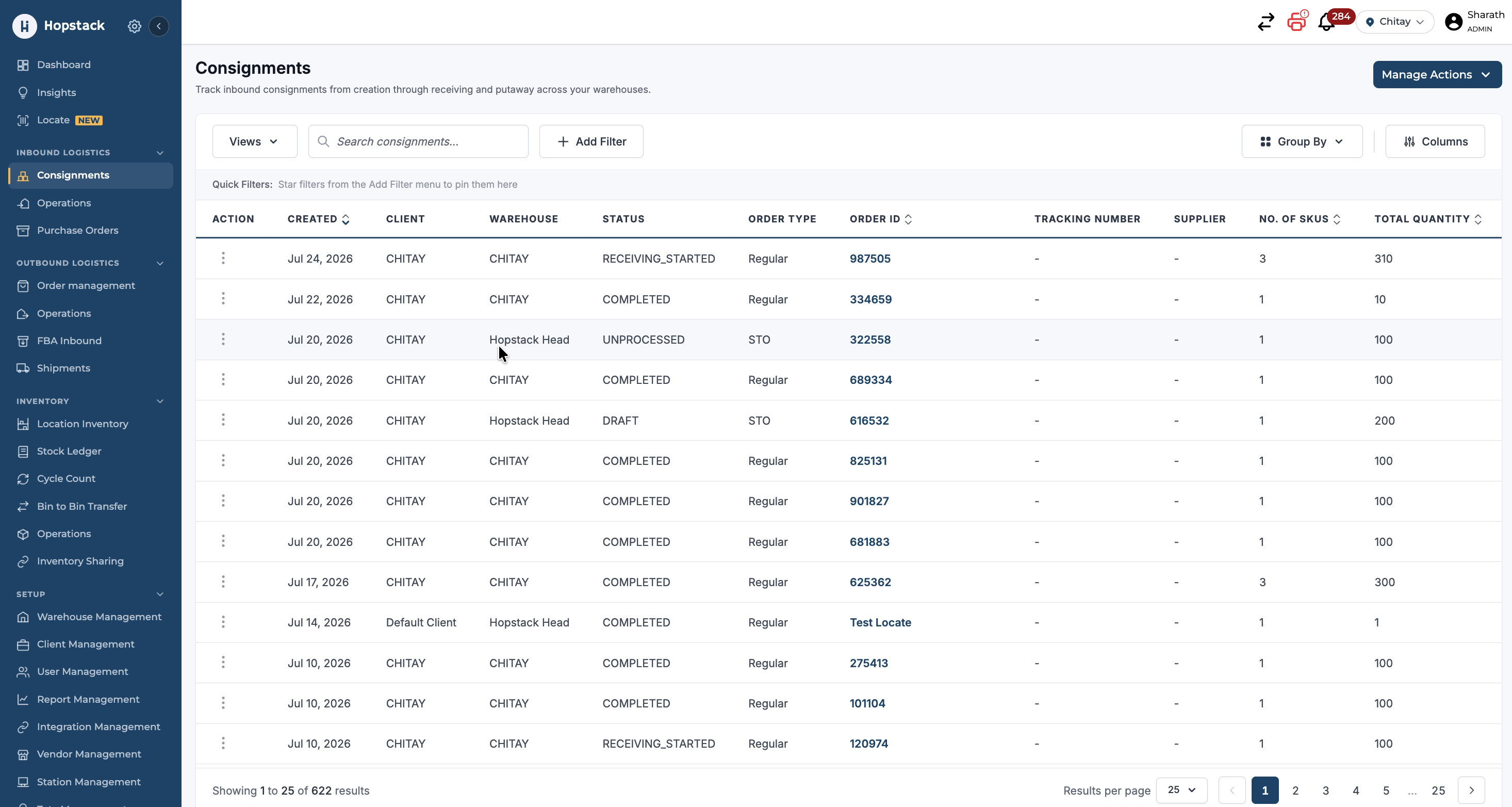
https://help.hopstack.io/__attachments/a_bee4d4a19ac506ad760c1e1490b521a359560e45abb20666479e663511ffd537/2.jpg%3Ft=1784893698&Expires=1784937048&Signature=IWfyCZ9owFN7QfO8PkfUT65WBiUxQO46TW~93PtYfCKaNxbnLQF6ENVsG98wI90kvPpaX77oaXNKkkKyPlrFrOuD3UglxQbmHNXtudYhEQ-Du2aHkzK0TZrCWhqjKDA7gD78o79gDFiArNN74SqQMe6gu8SLXKHtonK0Wl0egShGjRnRV6fRU4dZhKTjmeXGR9qzOyqknFB-f3v?cb=057093f40056a2d55b6a119b9bc449b9

Select Undo Receiving from the available actions.
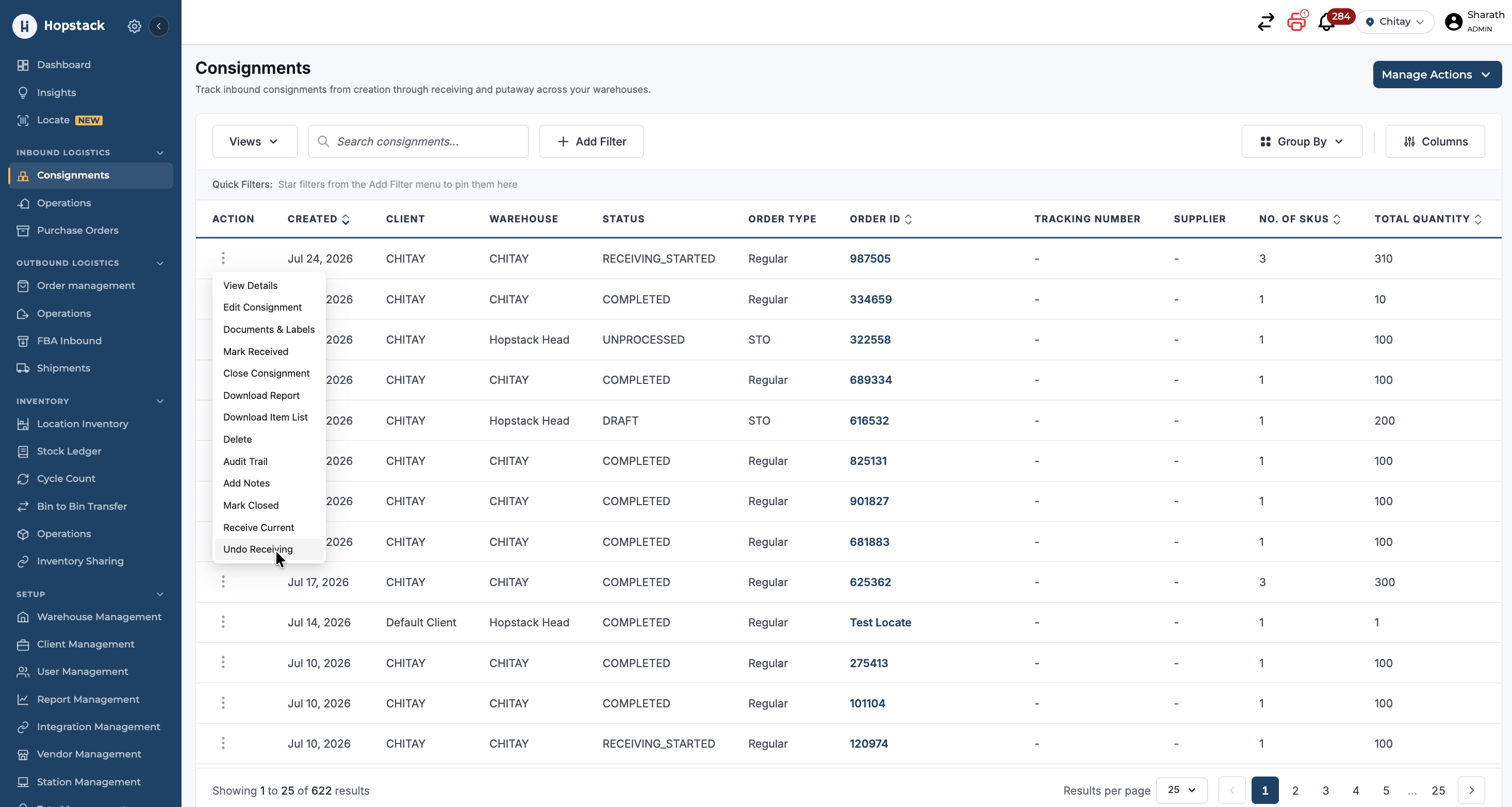
https://help.hopstack.io/__attachments/a_b12bedc152d9450eb46d831adb4b596ed43872ba4279dcc695a958ad22f76e8d/3.jpg%3Ft=1784893698&Expires=1784937048&Signature=gxj6C~fXX0ot3fHv~jnOVQfJ4ibc2ttQSAplmOca1t6wSel-V7ZNBkWwm4~XGsSmQLNifQC0dvvMPCFIvujdaB2msu-UxUp7z0ETSR2-aAI1VOrS-FOiTO7kEGXXpspIslDvX8JmW3vCZitMyeVbwRabvMy6keTg34JlSCVEukBoyY9tTFyGFHYAQUxiaSPwMShgfzcqknoiJvI?cb=b649f853709504163b705f2e8af0b49c

Step 3: View SKUs Available for Undo Receiving

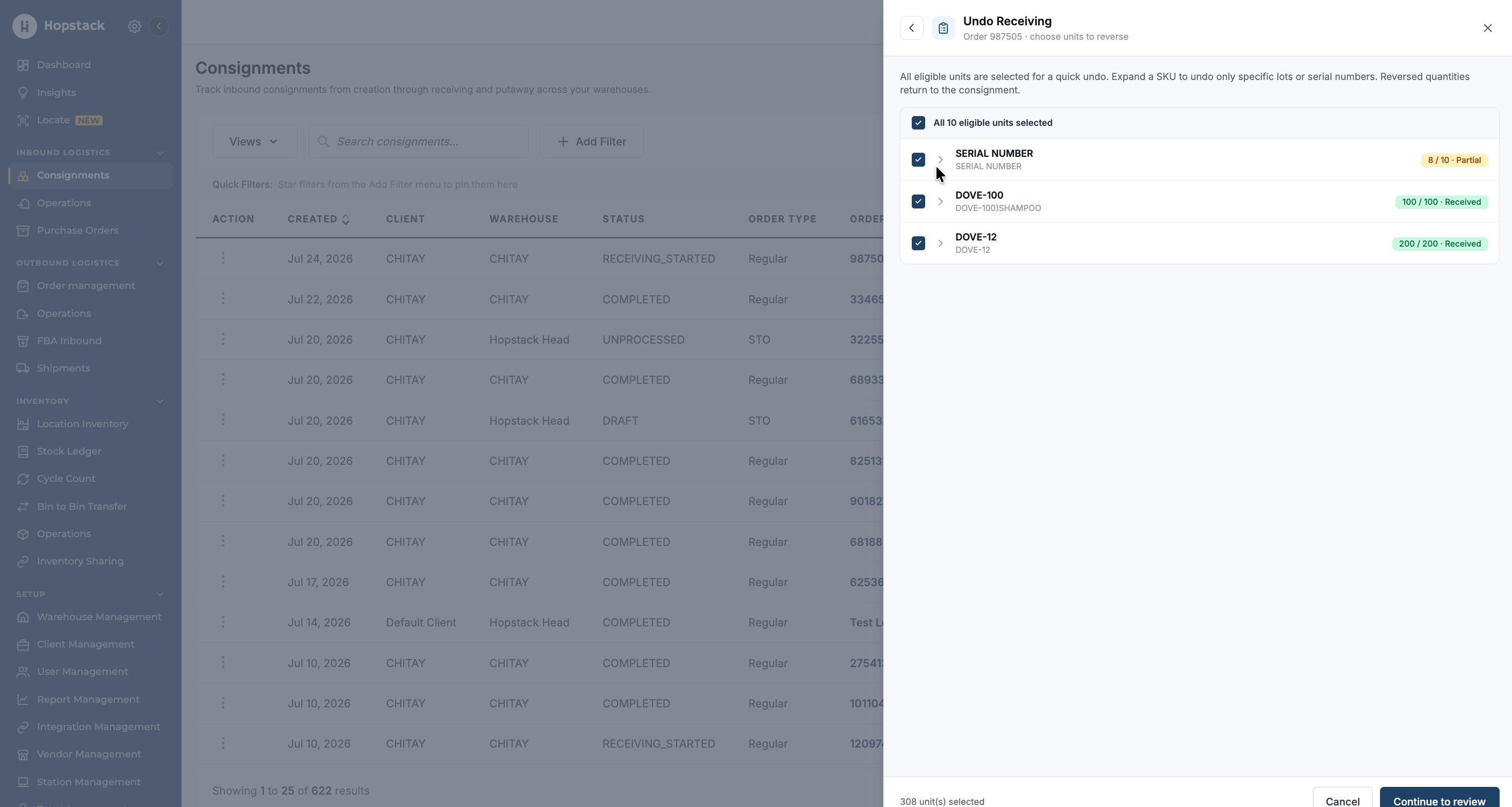
After selecting Undo Receiving, review the list of SKUs that are eligible for undo receiving.
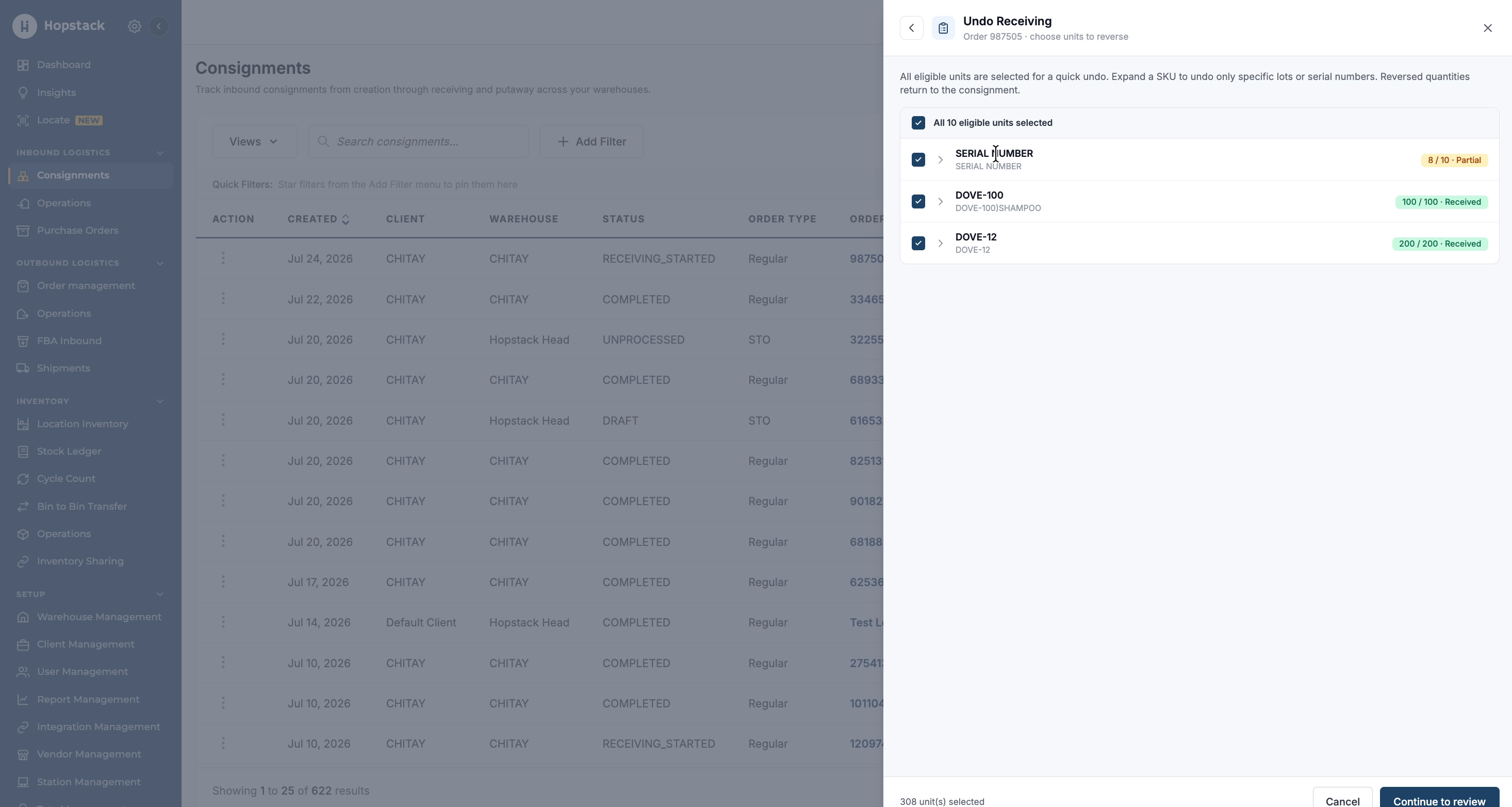
https://help.hopstack.io/__attachments/a_07eef7e32991c66e4f4b12be698a6003825c068eec22bbfd511999bf620e30b9/4.jpg%3Ft=1784893697&Expires=1784937048&Signature=g43xVjShb~IKWeEKgLeSlZP8upOQod2qq9W2eZlcPVD2352HqlLzUTCcXe~faD6K7PBv4m91TX2KagcFf-y5U8vGq2S5mqYpgH-irRNJja-85R9CA-ATkTlw4K1mqyrev8l~DY~cyxM6QosffdNw2xwbBSXH5mG4wHKQZpJbEYkf3hP7Qd4BYTTmE5tzyjBOIMFnlHOa7FJFD5M?cb=3518e077349a5bcff9a9671bcc38d44f

You can expand and view individual SKUs and their associated serials or lots.
https://help.hopstack.io/__attachments/a_ecde60034c441e0fa692822560d6257b66283275a3a79164f0e075425063b706/5.jpg%3Ft=1784893698&Expires=1784937048&Signature=O9INrOx6cXB2k2tjYF4aOlOvYRJ2L6lK-Ti6NypIF3wXJWU7O7dhjQ1XKBER2iZt6O2zfhqgIvMBWK6XGKhiR~vIh36XqubWbGr8~7T6wOXiHm9wJot6BS4ui0nzYHD3JlZKmuLxgnpe1oyDWT6H4qFRlpk6BhzU-TsbiRoZgESqyeFKex1VSCv~XPpmWF~CpA2xHrb4xXU7Anl?cb=f7920b4b31fed782866ccf71a69d47bb

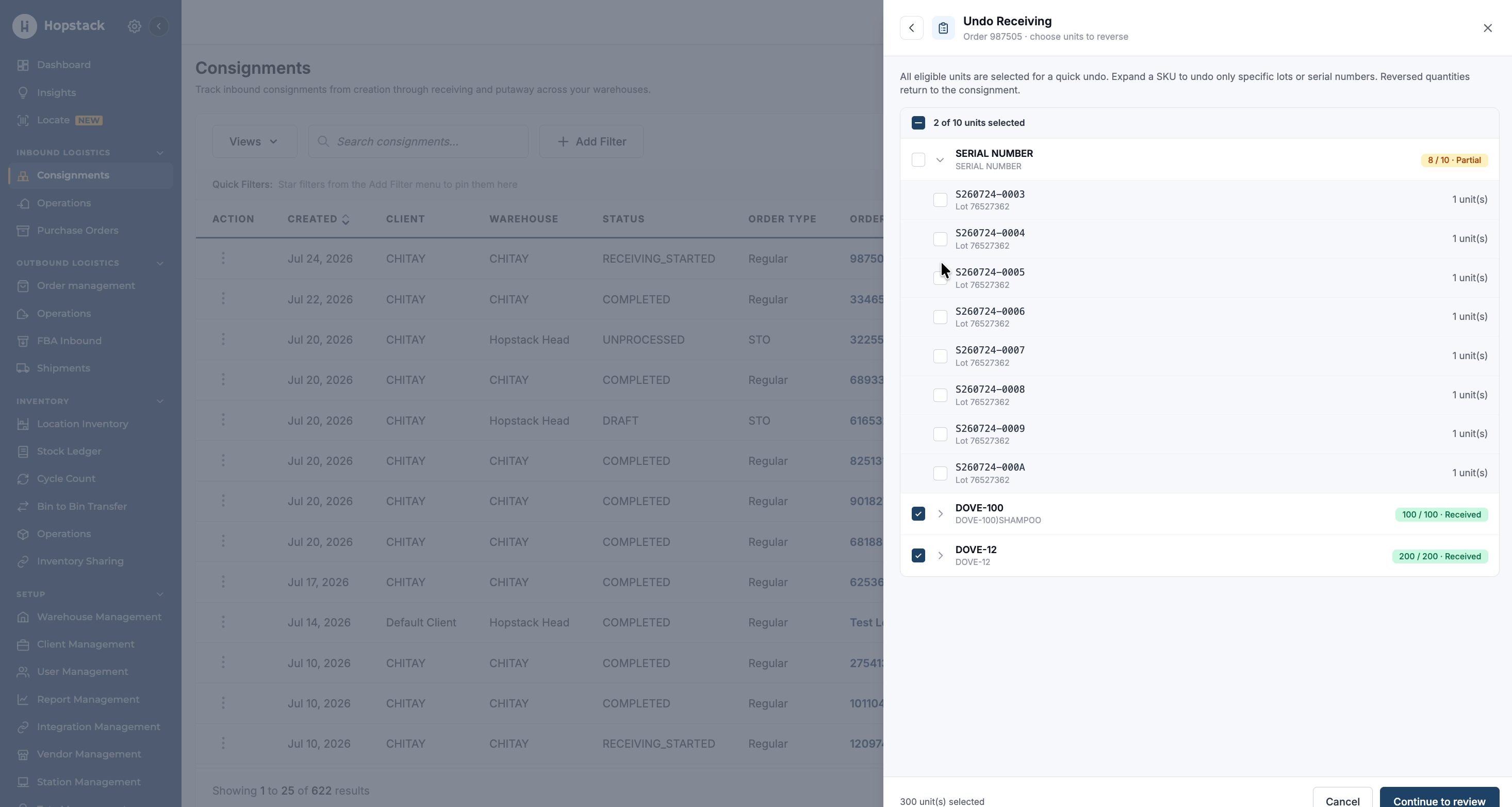
Step 4: Select Serial Numbers to Undo Receive

For serial-controlled products, click the product to expand its serial list. Use the checkboxes to either select all serial numbers or only specific serials that you want to undo receive.
https://help.hopstack.io/__attachments/a_88b9ecb7105b4ba6b3d601182d8071222373fbe2bb590c5680418f9027c433a7/6.jpg%3Ft=1784893698&Expires=1784937048&Signature=VFBfLXl7cVQP0r1p9PNlyU7UIQMbwH4iZVCwlE42L9BsEBew1JM~vD7yrAwMOEWAezPLh778RBlq9mEaNuR0XiE695TwGpG6q~Ko37xb0jO1FE8-ba31wUeeJgGHfAQH1XRs1Uv0oI2Cbb9ar3O2LP8H7tjjPIX0YnAEOV~TOPFWETSfH2cC-KRx~pHC-xQh~NjwfXB~qsoZmNw?cb=7e52268491fd3e611a7ff9f4991e7003

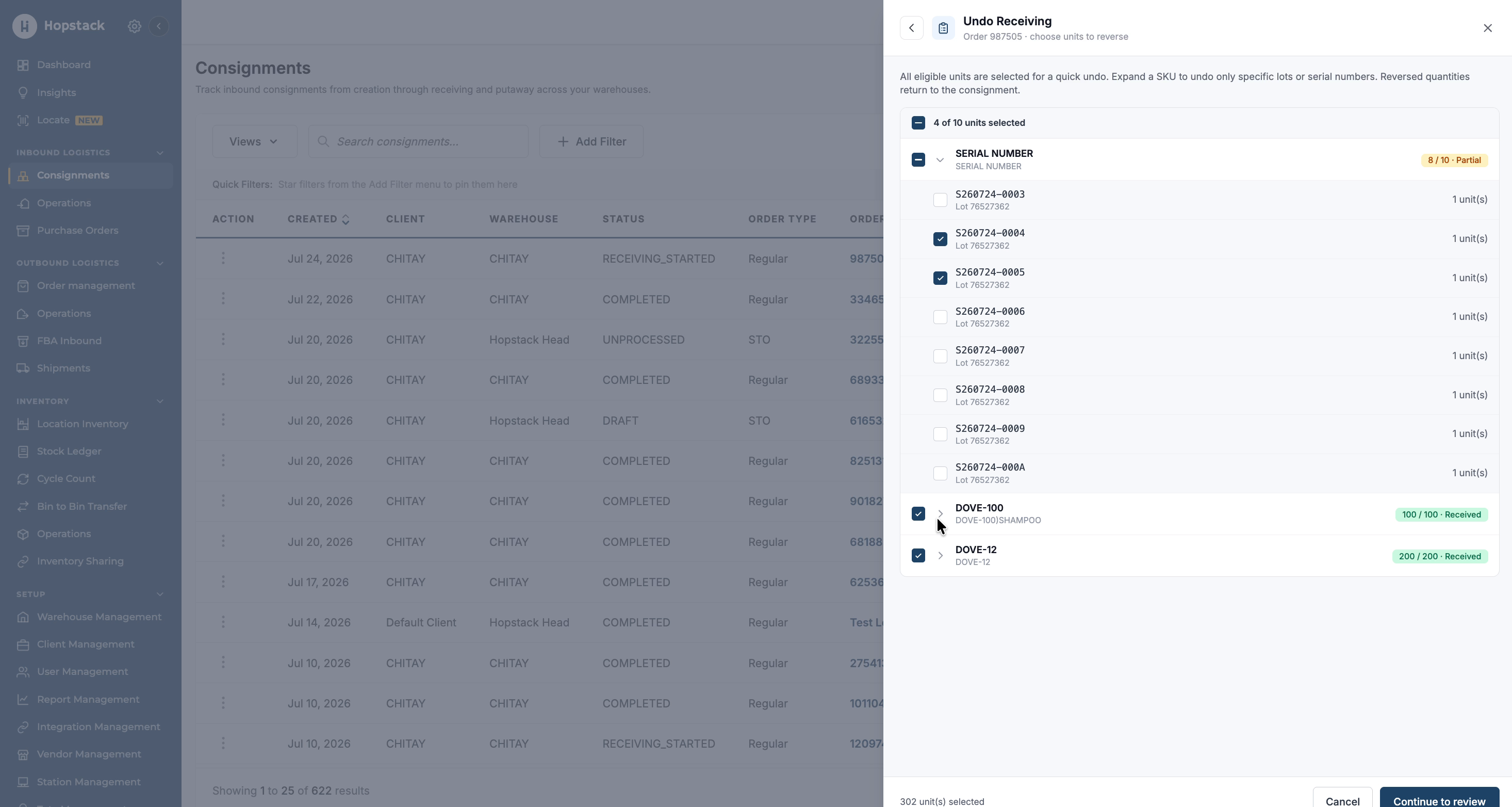
Step 5: Select Lots or Exclude Items as Needed

Select another product to review its lot IDs.
https://help.hopstack.io/__attachments/a_d2bc001d98c68fba061b3af76d8c6192c6e8ec71cf3aeeeac2cdc05c73facb1c/7.jpg%3Ft=1784893698&Expires=1784937048&Signature=Hu9Kva11BR6RSPiuf9TN-dbZDvoBAsd73XGyrybmAexphlrjVrYuil8pPU1o5dPmcJb3a0YFk5QrW-QBvfJx-zWx5D7v-N3~Lm~eewCOBrhMKmm1uuEfWDc0hwirpfzg78EzvPjIwLkttq-dNQNEQwCgCAqDyZlSi8VaDoytIJzoYqpE4bh84--oAnWm08XHSxEpVhz192rNGuI?cb=6b7f7b4933d6fd8ac43ec1c5dd2445b3

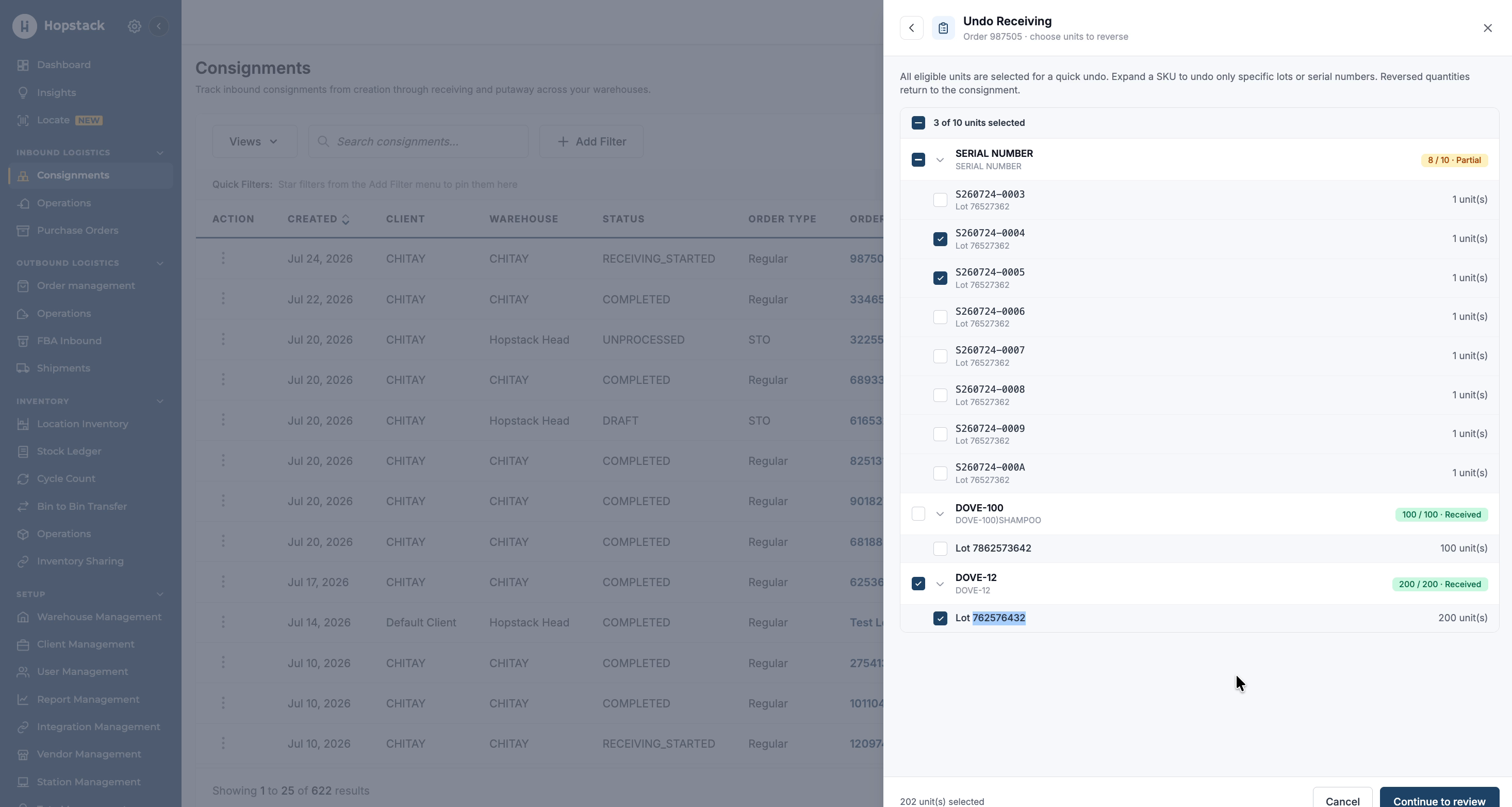
Choose one or more lot IDs that you want to undo receive. If there are items you do not want to undo receive, leave those serials or lots unselected and only select the lots or items for which you want to perform undo receiving.
https://help.hopstack.io/__attachments/a_9fed139b53fec14cfb601903d4a17166daefbcdfd49f03e04911a45e0e6ee759/8.jpg%3Ft=1784893698&Expires=1784937048&Signature=GONB9jwUwFsNVoLC7kBXSbb3wtAQvh83u-AigVz8nikaeQDt3mpzRCWjG-FqPyVAHJ6sQNf2AjJUfJOxkvtUA8JBLfwm2mPutv1wxUo7CaeHMQoSv593Mnkvl3CPVnSBmHZyxST5O6JgBQpEAr8zPaaCSK~sCnWj9WObp-bh0OlMdRjcF9vlrDEPQZ-NzXjd2QGUBYqWdUoqy2B?cb=ec82ce66450a6dd63e4dd48d6dd49e35

Step 6: Continue to Review

Once you have selected all required products, serial numbers, and lots for undo receiving, proceed to the next step by clicking Continue to Review.
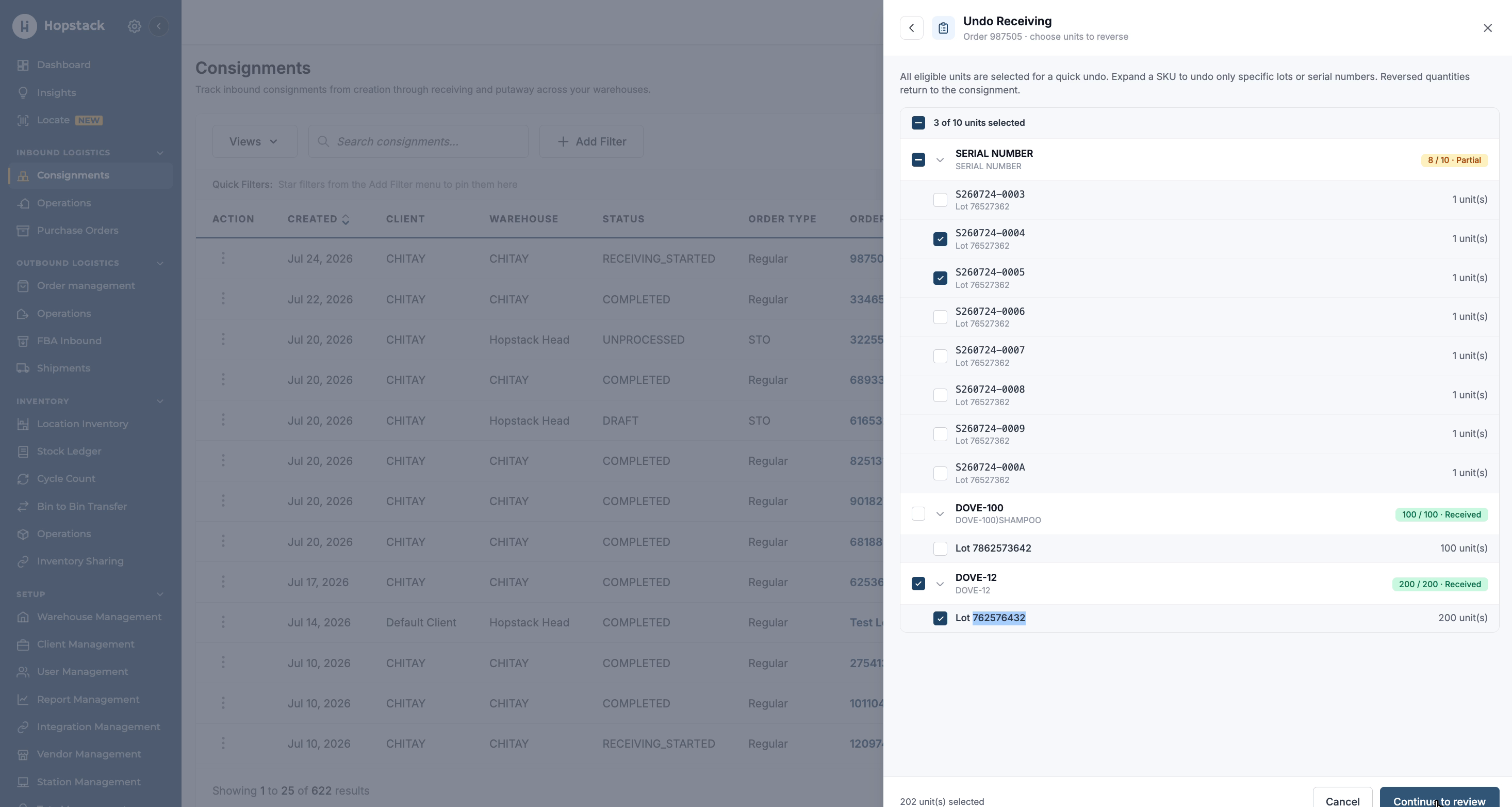
https://help.hopstack.io/__attachments/a_0d7656335f3d54275d3df84809d2a1d44c145fc4eebe2358b2d54631cb13fa6b/9.jpg%3Ft=1784893698&Expires=1784937048&Signature=a7bTV39YJX10h-SV6HwO6qG4ce4kSheFsbAfD3T5g9aTy8W-TUEt5jnVBIXx-WuuDAXGrA9o8aI6qmzgbS-69E3cBNENpf2yULMG3XRgwxfTz0ueTj6pFKegEJ5J3dYMKzQPXTO~JosDczojQvTLjjm40oa4zMf8YEyUnuNUI5dfdQL2lghMmnarOwjfWLoAV8JrJFly6Eo2KcK?cb=7b87f6066b8a5fb22e80db0f3c14465e

Step 7: Confirm and Apply Undo Receiving

On the review screen, verify the summary notification indicating how many items and SKUs will be affected. Confirm that the listed serial numbers and lot quantities match what you intend to undo. When your review is complete, click Confirm Undo Receiving to apply the changes.
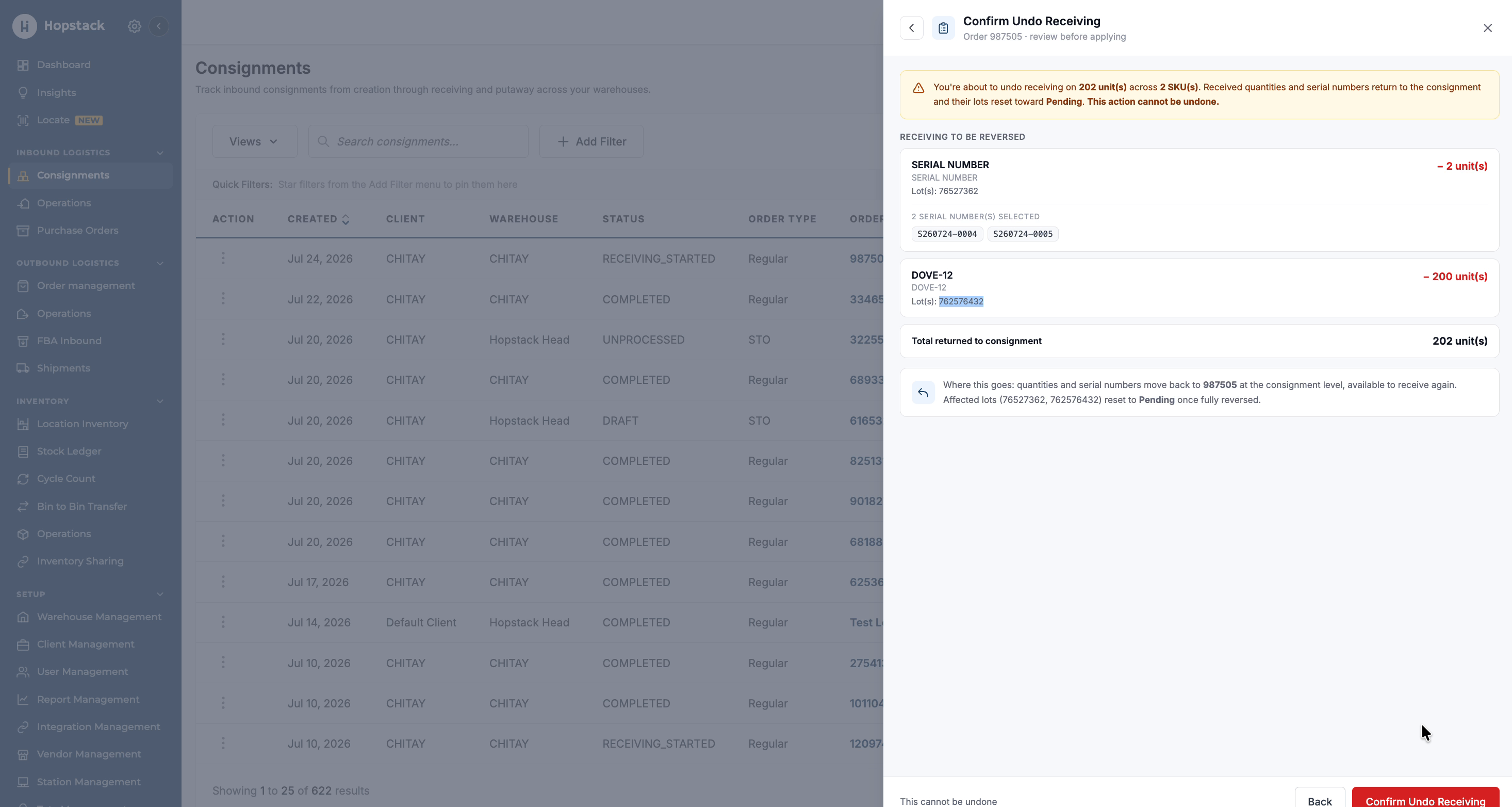
https://help.hopstack.io/__attachments/a_ad2d57f1d30d6505bc5d3a3a14a2b414d786274c1a24def4f2971cacd0717a1b/10.jpg%3Ft=1784893698&Expires=1784937048&Signature=NU7GjzhOrgbH8R3peqnBu~VFxBvoGMWAFeqyWahFUeArjtuKzPfvGebFKK~ssteD7D-RI4RRRJ1RKCPbHFhPCyLG2lAskPT8aVDofWpW9fG0OhqQKRxrBbhgBOTmC8y64Ra-fOzLoBvLLieLPHOVS0y3Hl~zP8EV7tW5r7Xkpj5S-zeFwitMnfrMDWWbZEdGDG15H0i51QbShU?cb=8dea17a78bbb09f435d819de497f95e6

Step 8: Verify the Updated Consignment

After confirmation, check for the success notification indicating that undo receiving has been applied and that you can return to the consignment.
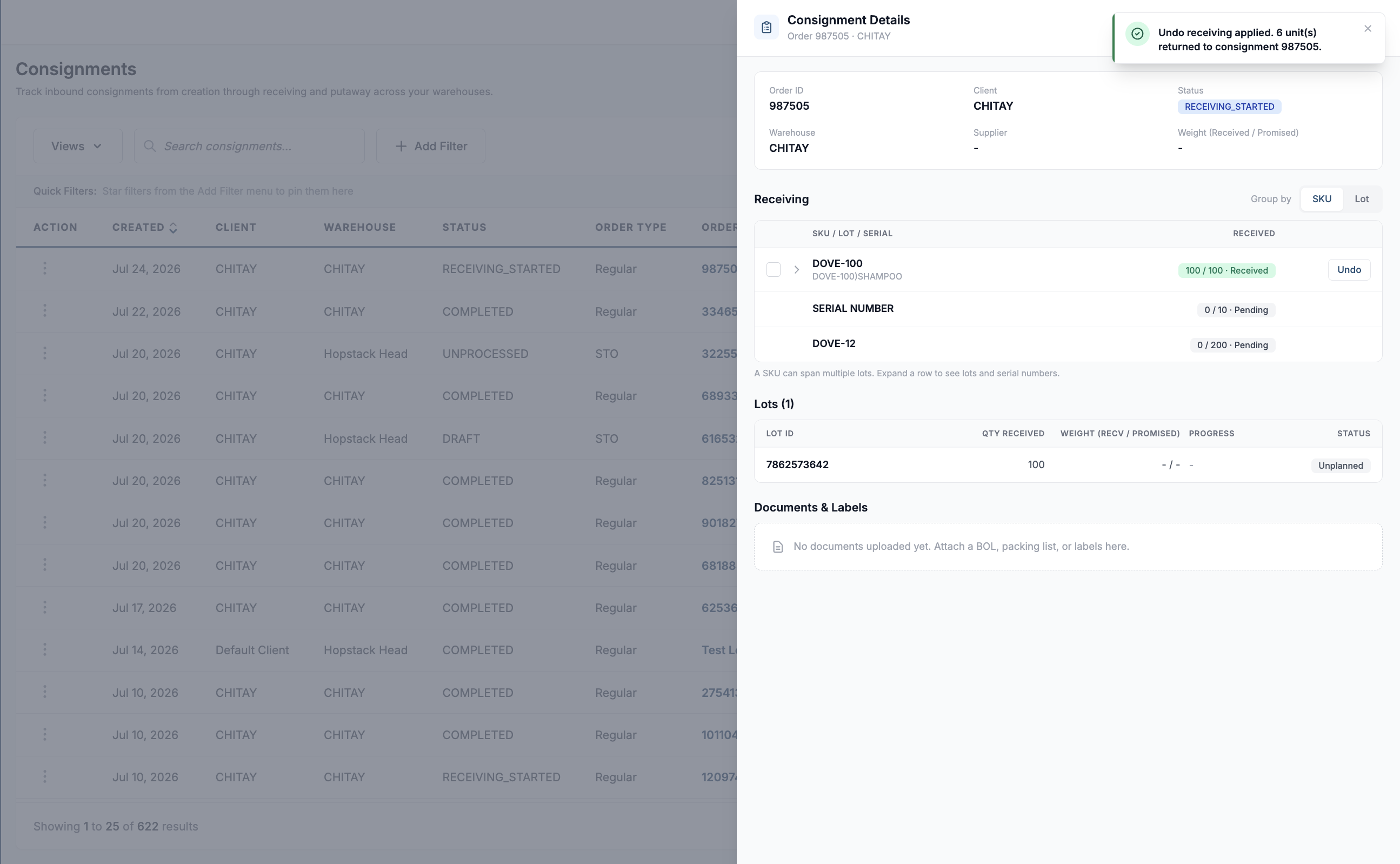
https://help.hopstack.io/__attachments/a_5d48e9177817dc0360e4a5bdc7304af516b0fa6b41f80f95a556b94e847cef9b/Screenshot%202026-07-24%20at%205.26.21%E2%80%AFPM-20260724-115629.png?cb=093523bd49944fe0144c7fa09d92f707

Navigate back to the consignment or order details page and verify that the selected items have been undone and are now available to be received again as needed.
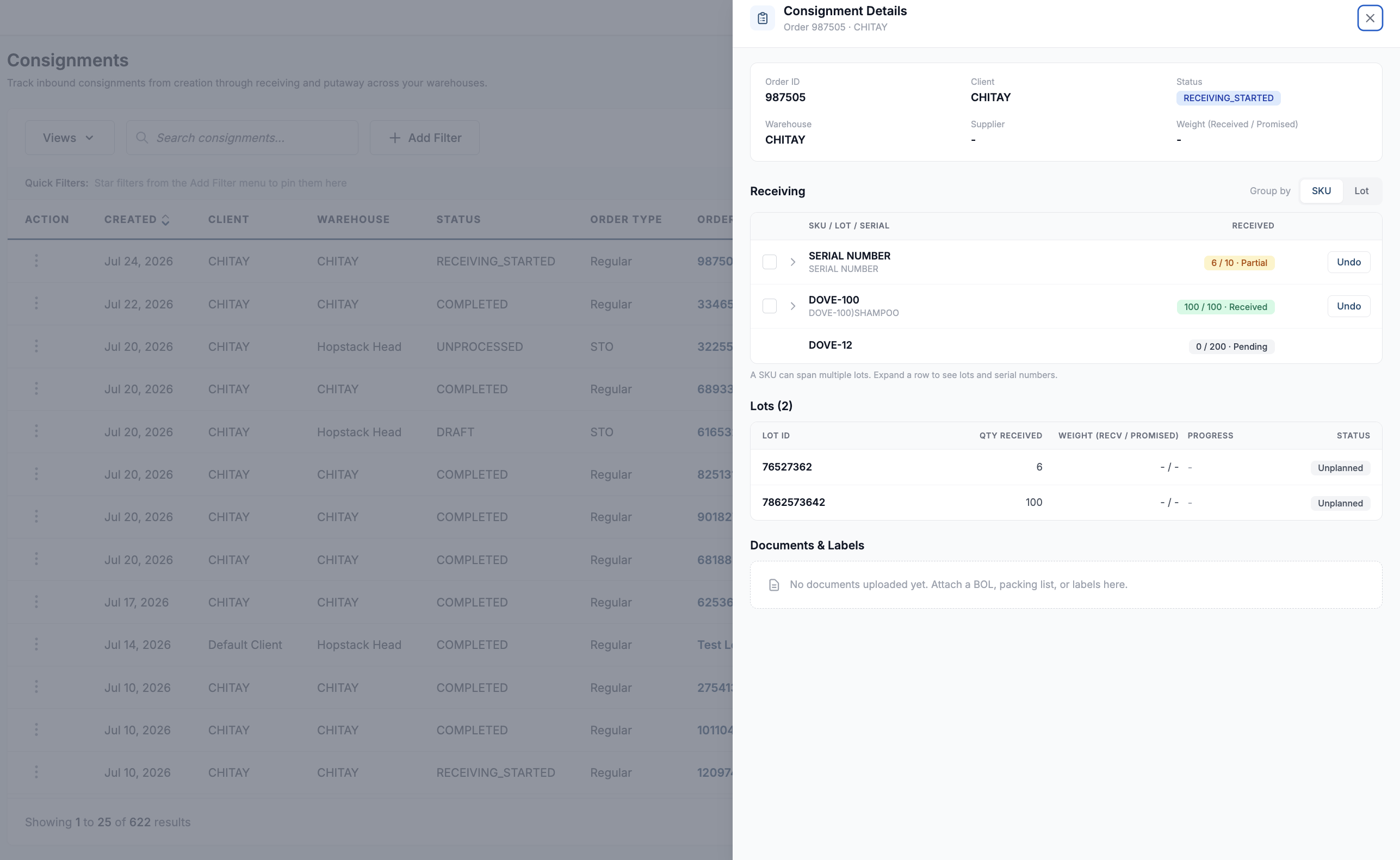
https://help.hopstack.io/__attachments/a_7540c246f0c8c3bc12b97a8cc92b14caf8c1581918be52de84fbff4fb5d9e2bf/Screenshot%202026-07-24%20at%205.25.35%E2%80%AFPM-20260724-115543.png?cb=122f129ed395362d20593fa53546b506
    • Read the Confirmation Message: Ensure you understand the message, "Are you sure you want to undo this receiving? This action will make the consignment unprocessed."

    • Decision Time:

      • Click "Confirm" to proceed with reverting the consignment to its pre-received state that’s unprocessed.

      • Click "Cancel" if you do not wish to proceed or have clicked the button unintentionally.

  • Complete the Undo Process:

    • A success message will be displayed once the consignment status has been reset.

Audit Trail Update

When using the Undo Receiving feature, please be aware that all actions are recorded in the platform's audit trail to maintain a high level of traceability and accountability.

  • Action Logging: Each undo action will be logged with the exact timestamp of when the action was performed.

  • User Identification: The audit trail will capture the username of the Admin who performed the undo action.
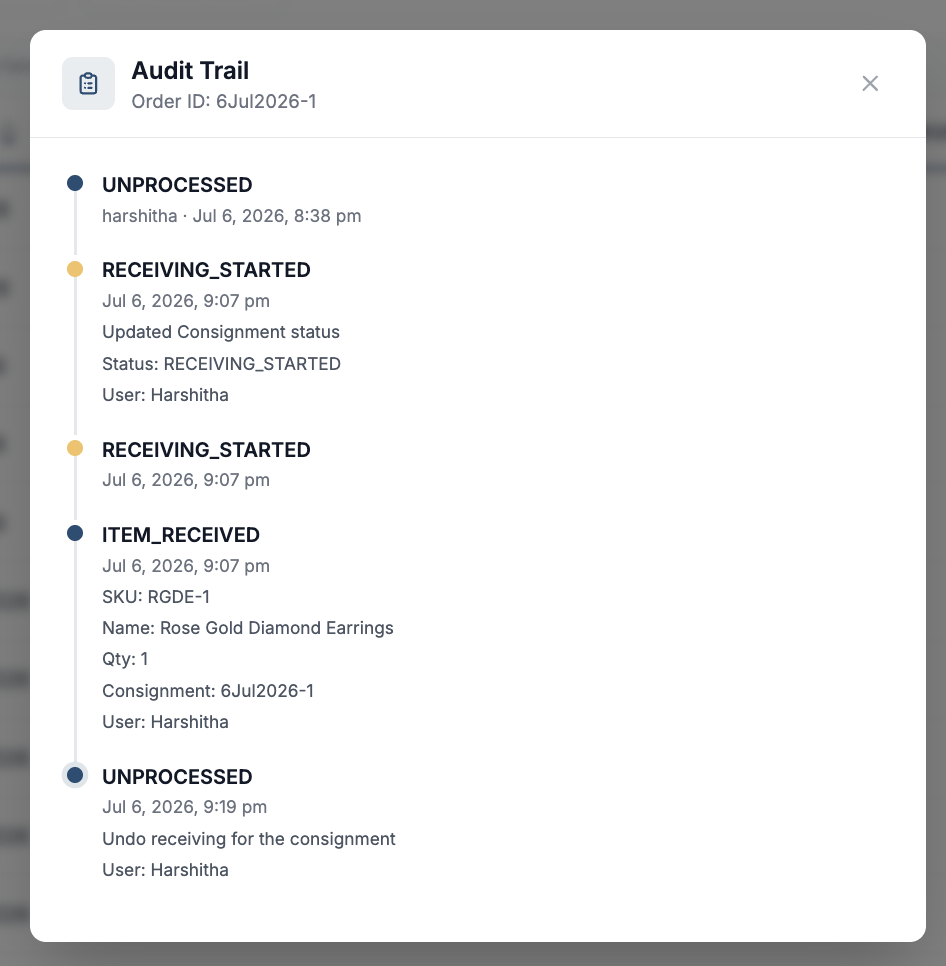
image-20260706-155310.png


Attempting Undo After Putaway Initiation

Administrators are advised that the Undo Receiving feature is conditionally available. It can be executed only if the consignment has not progressed to the putaway phase.

An attempt to undo receiving post-putaway initiation, the platform will present an error indicating the action cannot be completed.