
This documentation aims to provide concise information on the administrative actions available on the user management screen.
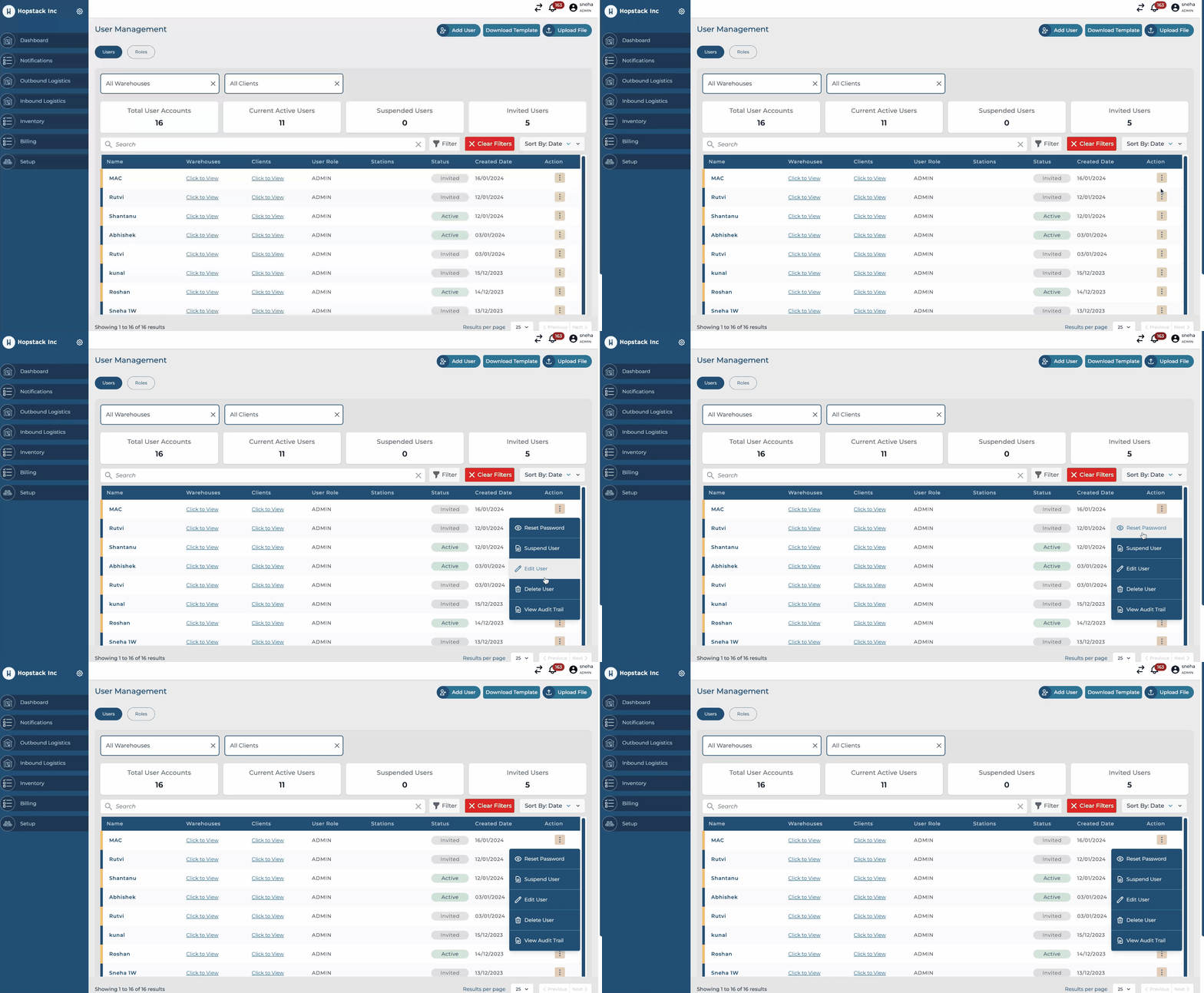
Reset Password
-
Action: Administrators can initiate a password reset for any user.
-
Outcome: The user will receive an email with instructions to reset their password.
Suspend User
-
Action: Temporarily disable a user's access to the platform.
-
Outcome: The user will be unable to log in.
-
Learn More: Suspending Users
Edit User
-
Action: Administrators have the capability to modify user details.
-
Outcome: User information can be updated as required.
-
Learn More: Editing a User
Delete User
-
Action: Permanently remove a user from the system.
-
Outcome: The user's data and account will be deleted.
-
Learn More: Deleting Users
Audit Trail
-
Action: View a comprehensive log of user activities and status changes.
-
Outcome: Administrators can monitor actions such as email activation requests, password resets, successful password setups, and login attempts, including timestamps and IP addresses.
Example Audit Trail Events:
-
EMAIL_ACTIVATION_REQUEST: Detailed log with date and time.
-
RESET_PASSWORD_REQUEST: Initiated by an administrator, with specifics on the requestor and timing.
-
SET_PASSWORD_SUCCESSFUL, LOGIN attempts: Shows success and access details, including IP address.